
A classroom geography game fits three lesson slots: a 5-to-10-minute bell ringer, a 15-to-20-minute activity, or a full 45-minute period with two games. The timings come from CityGuesser, the free multiplayer geography game we build, where a 5-round game of 60-second rounds takes about 4 minutes and the default 10 rounds of 90 seconds about 13. Across 363 rooms that looked like a class at school in spring 2026, a typical room had 11 players and spent a median of 12 minutes in the game. Most of the advice carries over to any guess-the-place game; the minutes and percentages are CityGuesser's.
How long does each setting take?
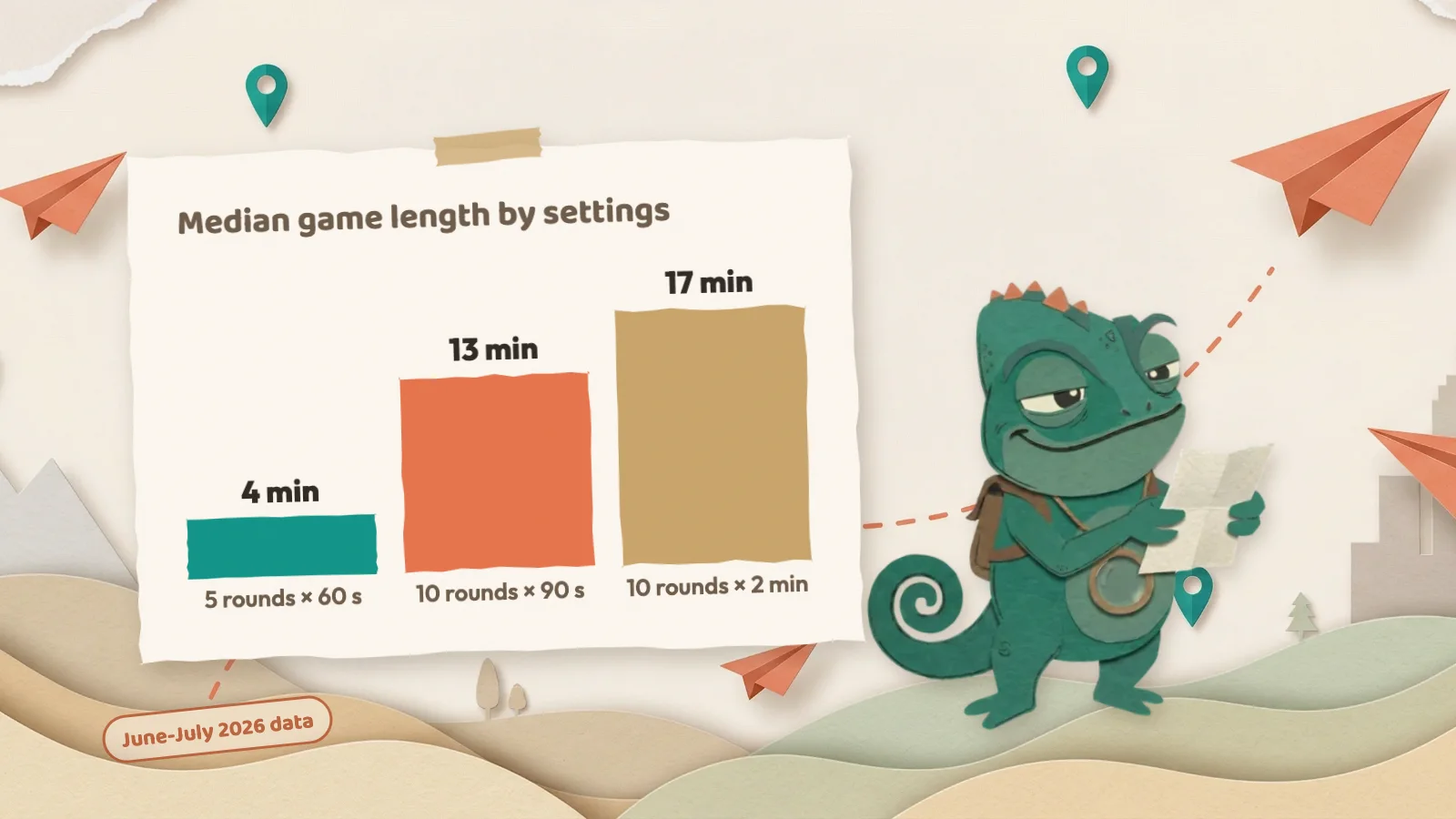
Median length of games with three common settings, from 4,384 CityGuesser games analysed in the 30 days to July 10, 2026:
| Settings | Real length (median) | Fits |
|---|---|---|
| 5 rounds × 60 seconds | about 4 minutes | a bell ringer or exit ticket |
| 10 rounds × 90 seconds | about 13 minutes | a main activity (this is the default) |
| 10 rounds × 2 minutes | about 17 minutes | a slower class, more talk per round |
The times include the reveals, which wait for the host to press next, so if you talk through every reveal you'll run a little longer. The 12-minute class median counts every game in the room, and until July 10 the default game was the 4-minute one.
A 5-to-10-minute bell ringer
Set the room up before the bell: 5 rounds × 60 seconds, filtered to the region you're about to teach. Then:
- Put the room code on the board. Students type it and a nickname; allow a couple of minutes for everyone to get in.
- Play the five rounds, which takes about four minutes.
- Ask one question about the last reveal: what gave it away?
On a 5-minute slot, have the code up as students walk in.
A 15-to-20-minute activity
Keep the default, 10 rounds × 90 seconds, and spend the extra minutes on the reveals.
- The day before (5 minutes): open a room on a student computer and check that a video plays.
- Before the bell (2 minutes): check Max players (see below), keep 10 rounds × 90 seconds, and filter the videos to the region you're teaching.
- Join (2 minutes): room code on the board.
- Round 1 (3 minutes): play it slowly together. Show where the map opens, how to drop and move a pin, and that a round ends when the timer runs out or when everyone, you included, has guessed. Half of abandoned 5-, 10- and 20-round games stopped by round two, so don't rush it.
- Rounds 2 to 10 (about 12 minutes): let it run. After each reveal, ask the closest student what gave it away.
- Afterwards (2 minutes): talk through the clues: signs, language, cars, vegetation, architecture.
A full 45-minute period
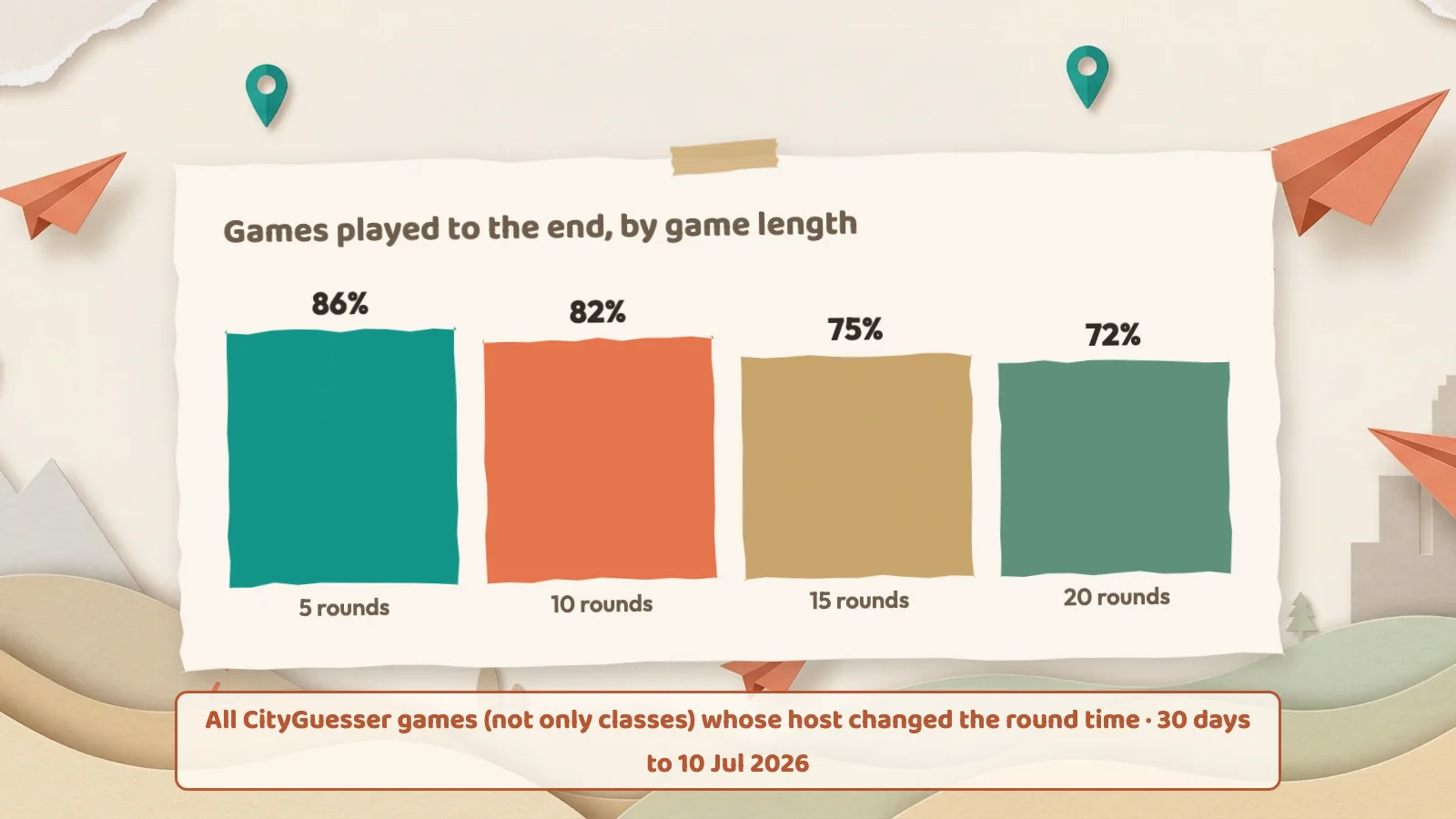
Run two 10-round games with a discussion in between rather than one long game, because longer games get abandoned more often. Among games with a recorded ending and a round timer other than 60 seconds, 86% of 5-round games and 82% of 10-round games were played to the end, against 75% at 15 rounds and 72% at 20.
Bigger groups finish more often: in games with 6 or more players, 99% of 5-round games and 97% of 10-round games reached the end.
A period that works: 5 minutes to join and explain, a first 10-round game (about 13 minutes), 8 minutes on the clues students spotted, a second game filtered to a different region (another 13), and 5 minutes to compare the two. Switching regions gives the second game a point: students can say what changed between, say, Southern Europe and Southeast Asia.
No laptops, or YouTube blocked for students?
Play on one screen. Open a room on your computer, put it on the projector, and play as the only player: let the class argue for 30 seconds, take a show of hands between two or three countries, and drop the pin where most hands went. If you have a few devices but not one per student, make teams of four or five and have each team join under a team name.
The projector route also helps when YouTube is blocked for student accounts but not for yours, which can happen because school filters can treat teachers and students differently. CityGuesser plays walking-tour videos from YouTube, and in one July week about 1 in 15 recorded video plays across all players hit a playback block: stopped by the browser or the network, timed out, or the video could no longer be embedded. Some recovered on their own. If a video won't play on your own computer either, ask IT whether YouTube is blocked for the whole school.
How many students can join one room?
The median class room had 11 players, counting the host, and the biggest had 50 different players over the session. Kahoot reports a similar figure for its own school games: an average of 11.1 participants per hosted session in 2022.
A new room's limit is 10 players, the host included, unless your browser remembers a different limit from last time. Rooms go up to 250, but Max players offers set sizes (10, 15, 20, 30, 40, 50 and larger), so pick the first one that fits the whole class plus you before anyone joins, or the student who arrives after the limit is told the room is full.
Do classes finish the game?
In CityGuesser rooms that looked like school classes, 78.9% of games with a recorded ending were played to the last round (363 class rooms, April 6 to July 5, 2026). Counted the same way, friend groups playing in the evening or at weekends finished 72.5% of their games and people playing alone 44.7%.
Abandoned games end early: among abandoned 5-, 10- and 20-round games, the median game ended after one or two rounds whatever its length. Finished 5-, 10- and 20-round multiplayer games ended with 97 to 98% of their starting headcount, on average.
Will students use the chat?
Most classes do: 58.4% of class rooms had chat messages, and 20.8% of friend groups did. We only see that messages were sent; we can't read them.
Chat is part of every room right now; there is no switch to turn it off. Set the ground rules before the first round, and know that the host can remove a player from the room. You can also use the chat for the lesson: ask students to post one clue they spotted before they drop their pin.
Where do these numbers come from?
We build CityGuesser: everyone watches the same walking-tour video and drops a pin where they think it was filmed. The numbers here are anonymous totals from our own game servers, from three analyses we ran in July 2026: every room played between April 6 and July 5, 2026 (10,327 rooms); 4,384 games analysed from the 30 days to July 10, 2026, all kinds of rooms, for settings and game length; and our July 2026 video playback report.
Nobody tells us "this is a class", so we infer it from the room creator's local time. A room counts as a class when it had 10 or more players and was created on a weekday between 7:00 and 16:59, or had 5 or more players, was created on a weekday between 7:00 and 15:59, and came from a host who hosted at least three played rooms across two or more weeks, at least 60% of them on weekday daytimes, with a median of five or more players. The rule will miss some classes and catch some office teams. It never looks at chat, yet class rooms used chat far more than friend groups did, so we think it catches real classes. Class rooms were 3.5% of all played rooms but 16.5% of all player seats.
Don't grade the game on points. In the 30 days to July 10, 2026, over half of all guesses landed more than 500 km from the answer. Spend the time on the reveal and ask why a pin ended up in the wrong country. For more ideas, see our page for teachers and our guide to geography games for the classroom.